Subtitle Position Detection with OpenCV and Amazon Nova
A hybrid CV + LLM pipeline for automatic subtitle detection — 6 iterations to reach 83% accuracy on multilingual video.
中文版 / Chinese Version: This article is adapted from a Chinese original on AWS China Blog. 阅读中文原文 →
In a video translation pipeline, subtitle erasure requires knowing the vertical position range of subtitles in the frame — for example, 0.68,0.82 means subtitles sit between 68% and 82% of the frame height. Manually annotating this for dozens or hundreds of multilingual videos is prohibitively slow.
During a short-drama video translation PoC, we explored automated subtitle position detection. Our final approach — a hybrid of OpenCV image processing and Amazon Nova 2 Lite vision model — achieved 83% accuracy (deviation ≤ 5%) across 30 test videos spanning 15 languages.
This article documents the full thinking process, six iterations of the approach, and detailed test data. The complete code is open-sourced at aws-samples/sample-for-video-subtitle-detection-via-nova-2-lite.
Prerequisites
This solution runs on AWS, using Amazon EC2 for OpenCV and FFmpeg processing, and Amazon Bedrock to invoke the Amazon Nova 2 Lite model.
Environment setup:
- An AWS account with Amazon Nova 2 Lite model access enabled in Amazon Bedrock
- An Amazon EC2 instance (recommended: m8g.large or equivalent) with:
- Python 3.12+
- OpenCV:
pip install opencv-python boto3 - FFmpeg: for video frame extraction (Ubuntu:
sudo apt install ffmpeg, Amazon Linux:sudo yum install ffmpeg)
- An IAM role attached to the EC2 instance with
bedrock:InvokeModelpermission. Minimum-privilege policy:
{
  "Version": "2012-10-17",
  "Statement": [{
    "Effect": "Allow",
    "Action": "bedrock:InvokeModel",
    "Resource": "arn:aws:bedrock:*::foundation-model/amazon.nova-*"
  }]
}
For full setup and usage instructions, see the open-source repository README: aws-samples/sample-for-video-subtitle-detection-via-nova-2-lite.
Analyzing the Problem: Short-Drama Subtitle Characteristics
By examining a large number of short-drama video frames, we identified several patterns.
Favorable for detection:
- Dialogue subtitles typically appear in the lower half of the frame (~55%–85%)
- Subtitle text is usually white or yellow, providing contrast against the background
- Subtitle lines span the center of the frame, typically wider than 25%
Challenging factors:
- The bottom of the frame often has brand logos and promotional banners (colorful text, ~85%–97%)
- The top may contain episode titles or chapter headings
- Some frames are app UI screenshots with dense non-subtitle text
- Some frames have no dialogue at all (transition shots)
- 19 different languages with varying subtitle colors, fonts, and positions
Core challenge: Distinguishing dialogue subtitles from other text elements (titles, promotional banners, watermarks).
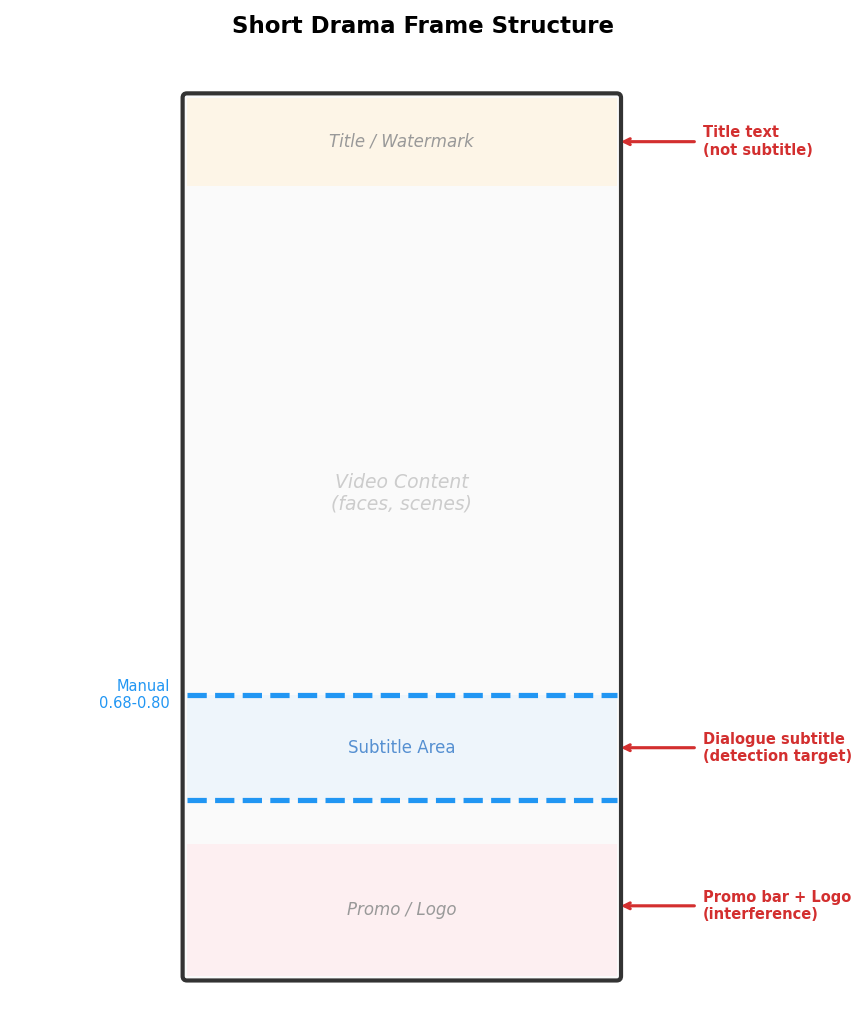
The following diagram illustrates the typical structure of a short-drama video frame. The blue dashed lines mark the actual subtitle position range:
Iteration History
3.1 Early Exploration: From 30% to 53%
We tried four approaches in succession, gradually discovering the strengths and weaknesses of OpenCV and Nova.
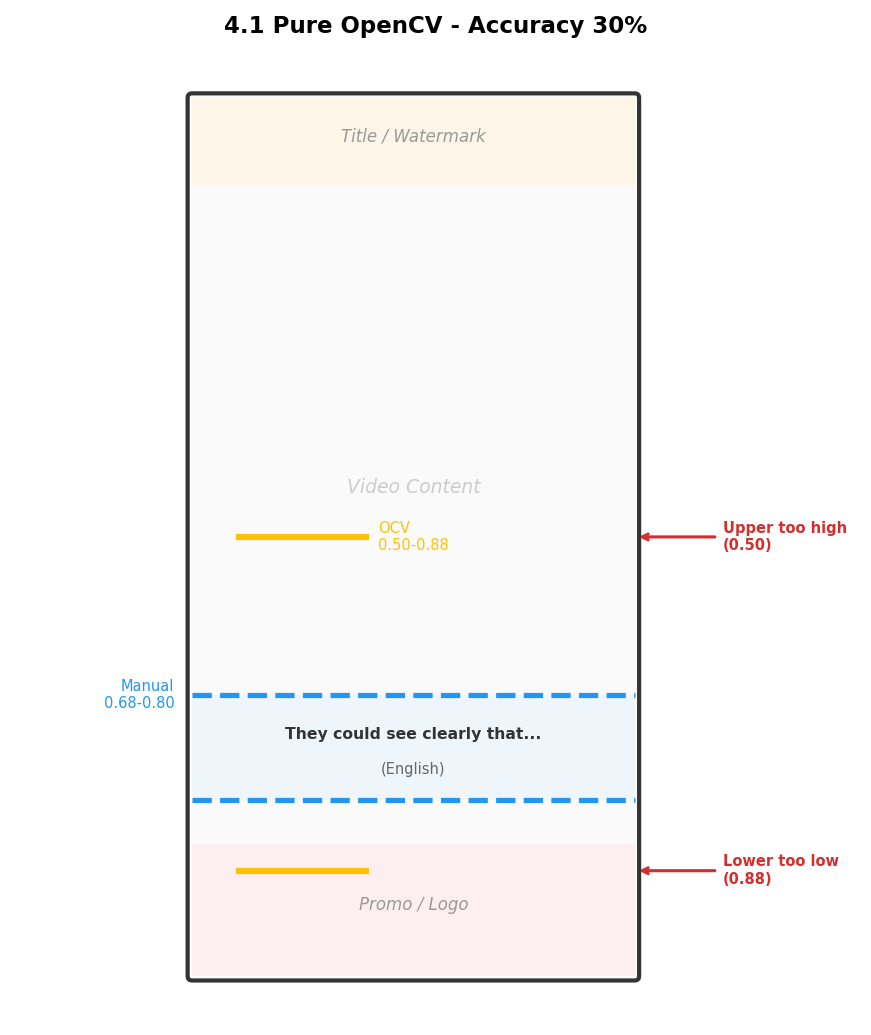
Version 1: Pure OpenCV (30% Accuracy)
Within the ROI (Region of Interest) at 55%–85% of the frame, we used white/yellow threshold detection + morphological dilation + contour filtering to locate subtitle lines.
ROI: The region of the image to focus analysis on. Here we restrict it to 55%–85% vertically, excluding top titles and bottom promotional banners.
Problems: The upper boundary often drifted too low (false positives from bright non-subtitle regions like clothing patterns and floor reflections), the lower boundary drifted too high (promotional banner text was also detected), and 7 videos produced zero detections.
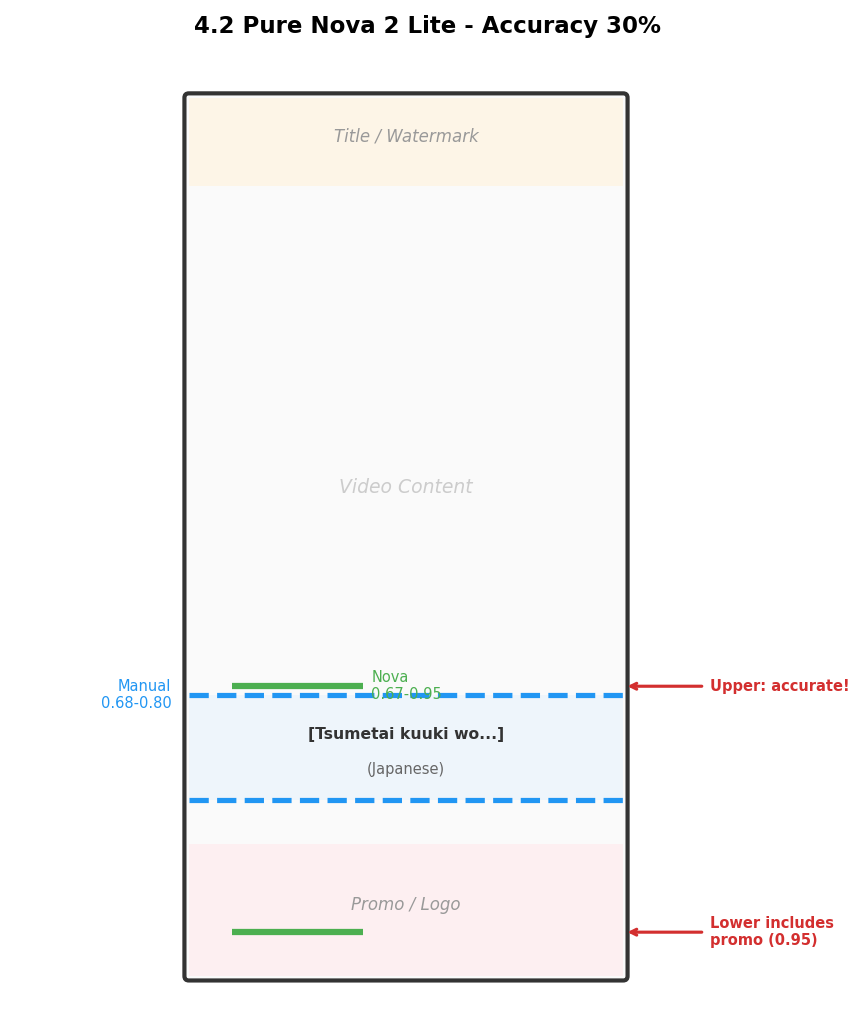
Version 2: Pure Nova 2 Lite (30% Accuracy)
Since OpenCV cannot understand content semantics, we turned to a vision model. Asking Nova to return percentage positions directly gave poor results. Switching to a bounding box detection format (0–1000 coordinate space) dramatically improved accuracy:
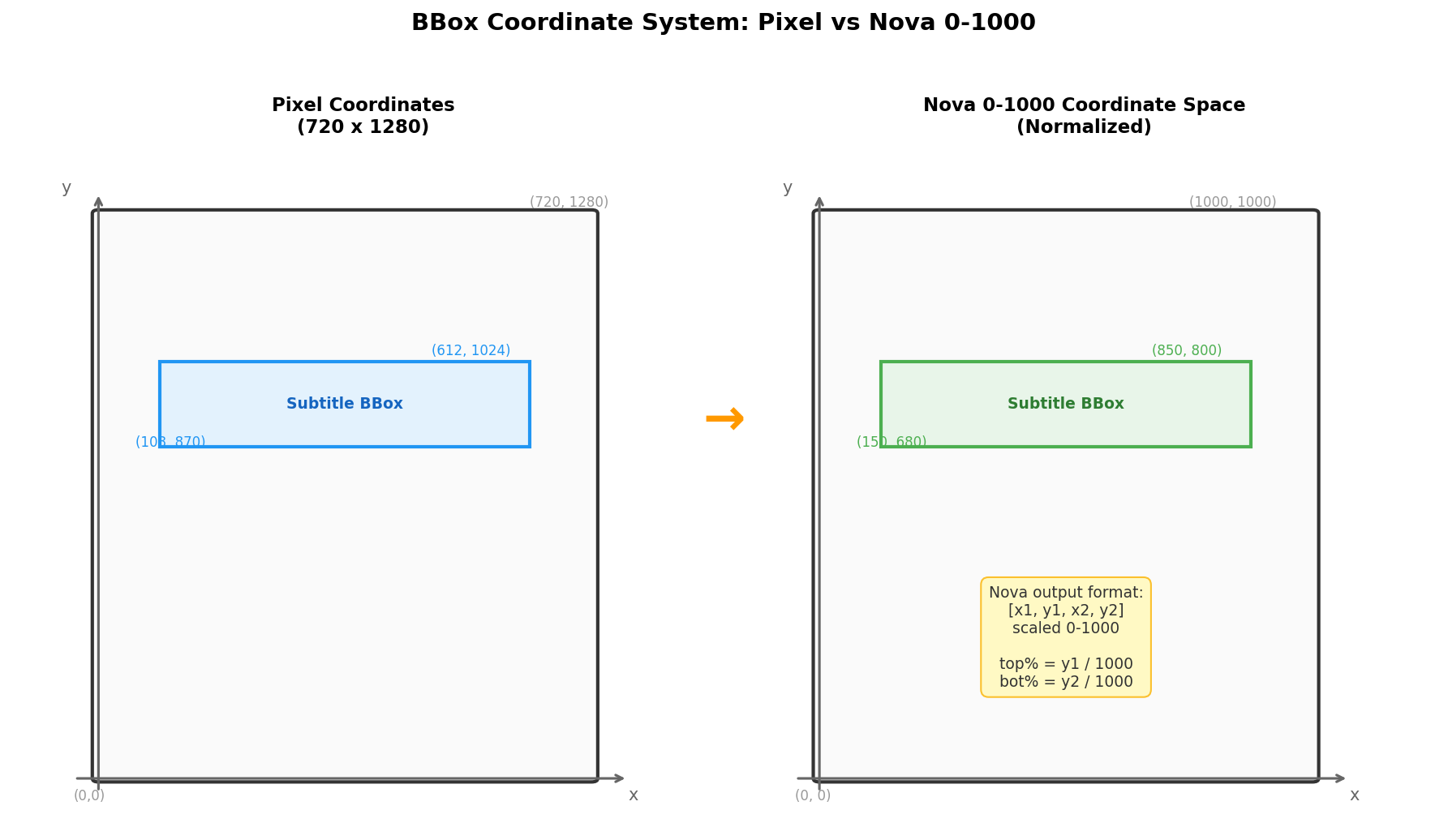
The prompt sent to Nova 2 Lite:
Detect all [dialogue subtitle (white or yellow text showing what characters
are speaking, located in the lower half of the video frame)] in this image.
For each detected object, output the class label and bounding box coordinates
in the format [x1, y1, x2, y2], scaled between 0 and 1000.
Output as JSON: [{"label": "class", "bbox": [x1, y1, x2, y2]}]
Strength: Upper boundary was very accurate (deviations ≤ 3%). Problem: Lower boundary frequently reached 0.90+, including the promotional banner area.
Version 3: Nova Classification + OpenCV Detection (56% Accuracy)
Used Nova for binary classification (subtitle present or not) to filter frames, then ran OpenCV on confirmed frames. But the bottleneck was OpenCV itself — the frames Nova filtered out were ones OpenCV also could not detect, so filtering provided no additional value.
Version 4: OpenCV + Nova Intersection (53% Accuracy)
Key discovery: Nova’s upper boundary is accurate, OpenCV’s lower boundary is tight. Intersecting the two complements their weaknesses: top = max(ocv_top, nova_top), bot = min(ocv_bot, nova_bot).
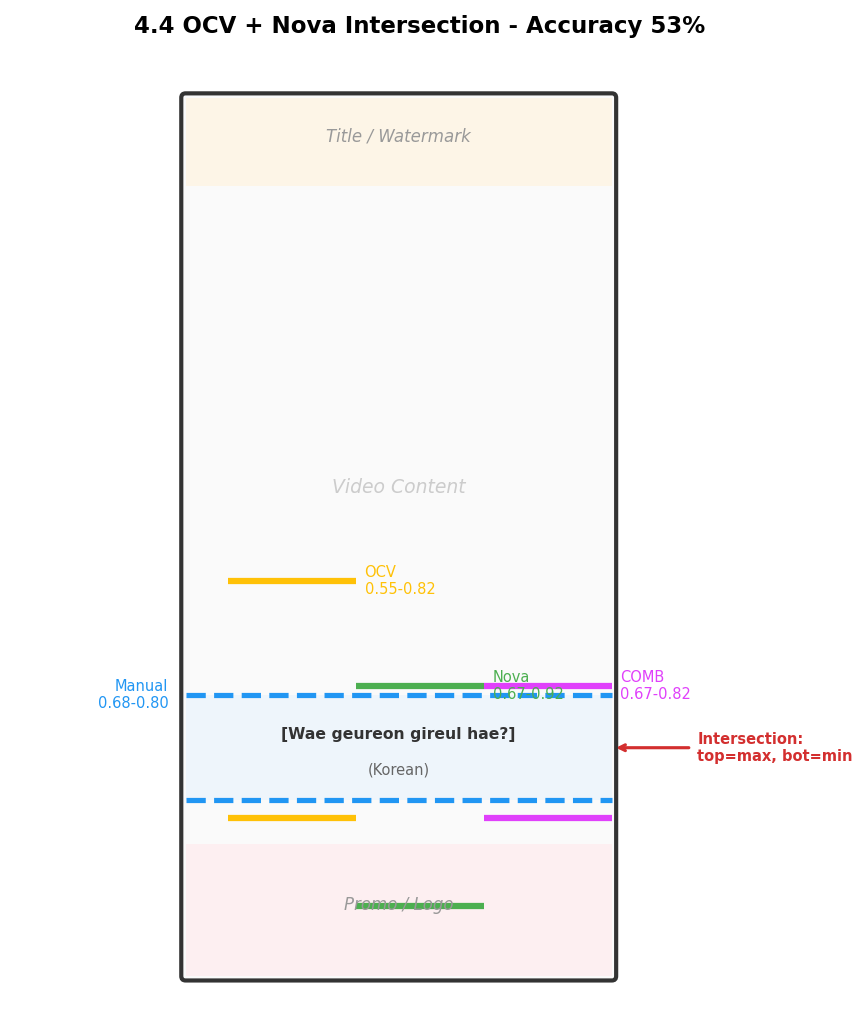
Core lesson from early exploration: No single method is sufficient — OpenCV excels at precise localization but is prone to false positives; Nova excels at semantic understanding but lacks positional precision. Intersection is the right direction, but further optimization is needed.
3.2 Version 5: Smart Frame Extraction + Intersection + Lower-Boundary Cap (76% → 80%)
Three optimizations on top of Version 4:
Optimization 1: Smart frame extraction
Instead of fixed 5 frames at 10%/30%/50%/70%/90%, many of which happened to have no subtitles:
- Start at 5%, sample a frame every 5%
- Use OpenCV to quickly check if the frame contains subtitles
- Skip subtitle-free frames, continue sampling
- Stop after collecting 5 frames with confirmed subtitles
The following diagram shows the smart frame extraction workflow:
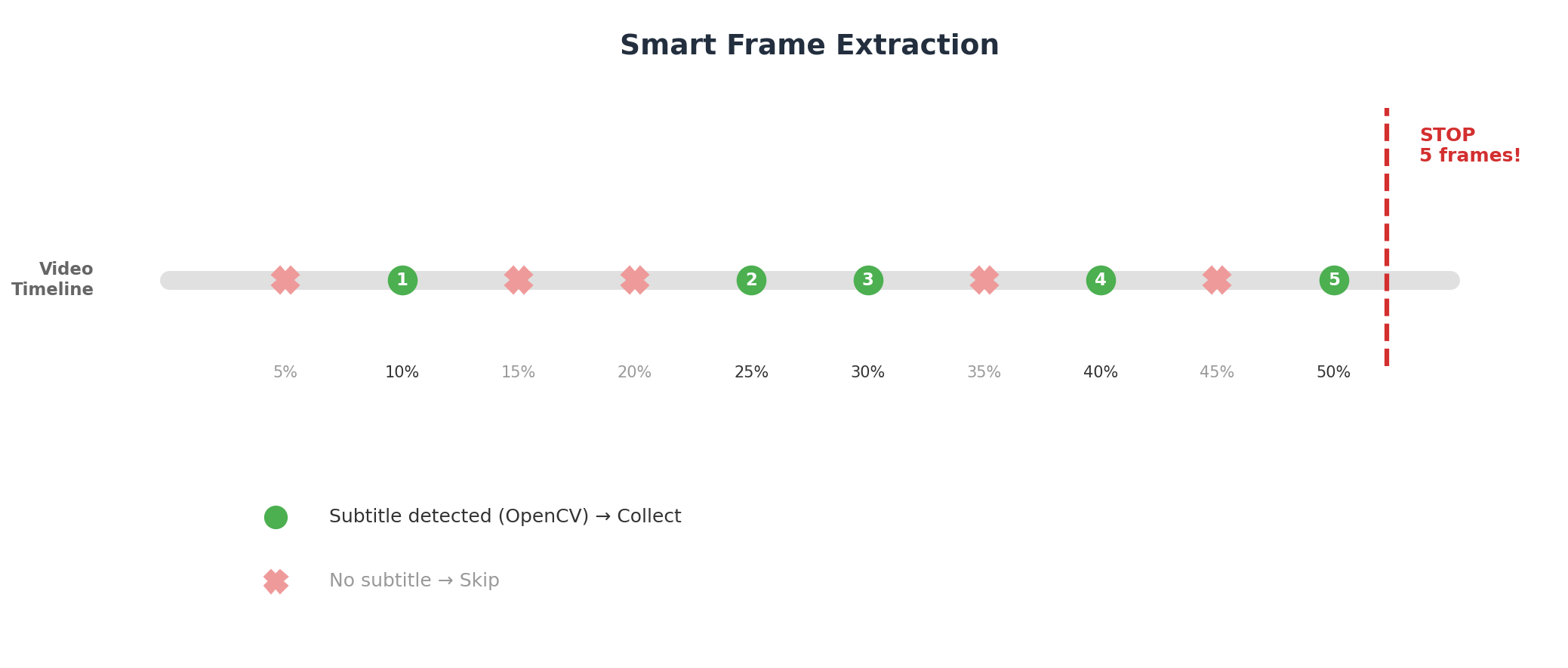
This ensures every video has enough valid frames for detection.
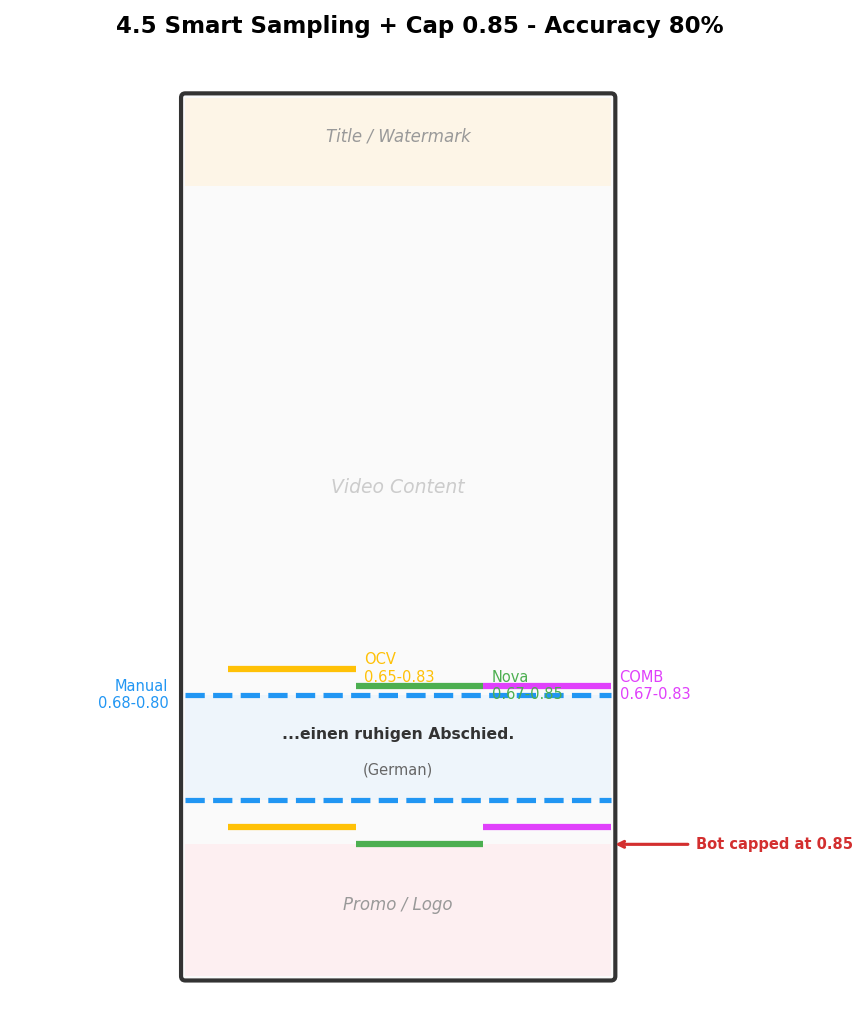
Optimization 2: Lower-boundary cap at 0.85
Through observation, dialogue subtitles almost never appear below 85% of the frame. Anything detected below 85% is almost certainly a promotional banner. We simply cap the lower boundary at 0.85.
Optimization 3: Aggregation strategy
- Upper boundary: minimum across all frames − 2% (to cover the highest subtitle)
- Lower boundary: maximum across all frames + 2% (to cover the lowest subtitle), capped at 0.85
Results: OpenCV alone 40%, Nova full-frame 63%, combined 80%.
The following example from a German video shows how smart frame extraction and lower-boundary capping significantly improved detection accuracy for all three methods:
3.3 Version 6: Cropped Frame Detection (83% Accuracy)
Version 5’s main issue: Nova’s lower boundary was still too large — it included the promotional banner (logo + colorful title text) at the bottom.
Key insight: If we crop the frame to only the 50%–85% region before sending it to Nova, the promotional banner and top titles are not in the image at all. Nova cannot be confused by what it cannot see.
The following diagram shows the full crop-and-remap pipeline — this is the most critical optimization in the entire approach:
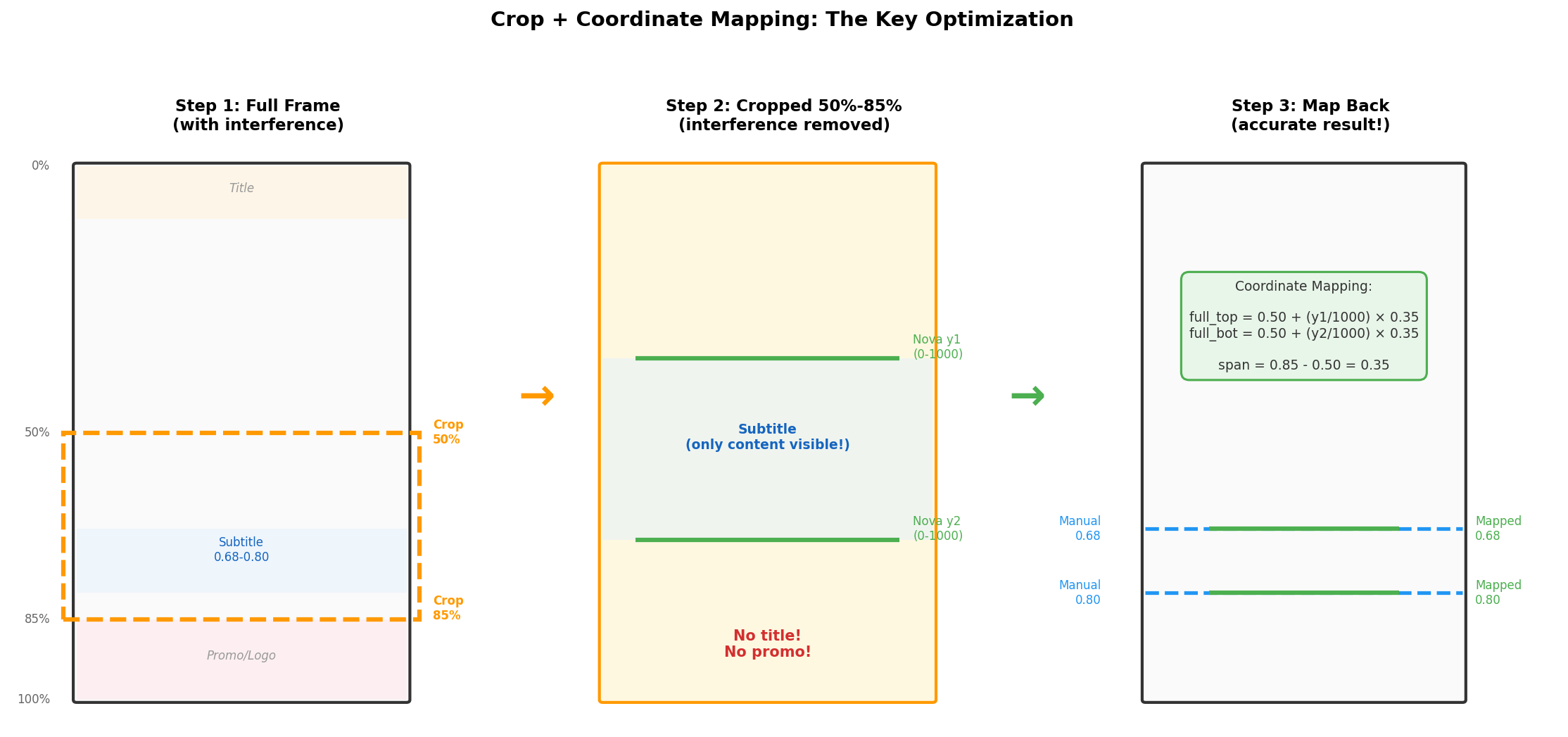
Original frame → Crop 50%-85% region → Nova bbox detection → Map coordinates backCoordinate mapping: Nova returns 0–1000 coordinates within the cropped image. Map back to full-frame coordinates:
full_top = 0.50 + (crop_y1 / 1000) * 0.35
full_bot = 0.50 + (crop_y2 / 1000) * 0.35
Validation: For a frame where full-frame Nova completely missed the subtitle, the cropped version successfully detected the position at 0.70–0.78 (ground truth: 0.68–0.83). With the promotional banner removed from the image, Nova could focus on the actual dialogue subtitle.
Final combination: OpenCV detection + Cropped Nova bbox detection, intersected:
top = max(ocv_top, crop_nova_top)
bot = min(ocv_bot, crop_nova_bot)
We also tested using Nova cropped classification for smart frame extraction (replacing OpenCV), but accuracy actually dropped from 83% to 73%. Nova classification mistakenly flagged frames with only promotional text (no dialogue) as “having subtitles.” OpenCV-based frame extraction naturally filtered these out — if OpenCV detected nothing, it simply skipped the frame.
| Frame Extraction | OCV Alone | Nova Cropped Bbox | Combined |
|---|---|---|---|
| OpenCV-based | 40% | 80% | 83% |
| Nova classification-based | 46% | 66% | 73% |
All method comparison:
| Method | Accuracy (≤5%) | High Deviation | Missed |
|---|---|---|---|
| OpenCV alone | 12/30 (40%) | 18 | 0 |
| Nova full-frame bbox | 19/30 (63%) | 11 | 0 |
| Cropped classification + OCV | 15/30 (50%) | 15 | 0 |
| Cropped bbox alone | 24/30 (80%) | 6 | 0 |
| OCV + Nova full-frame | 24/30 (80%) | 6 | 0 |
| OCV + Cropped bbox | 25/30 (83%) | 5 | 0 |
Cropping alone boosted Nova from 63% to 80%; combining with OpenCV pushed it to 83%.
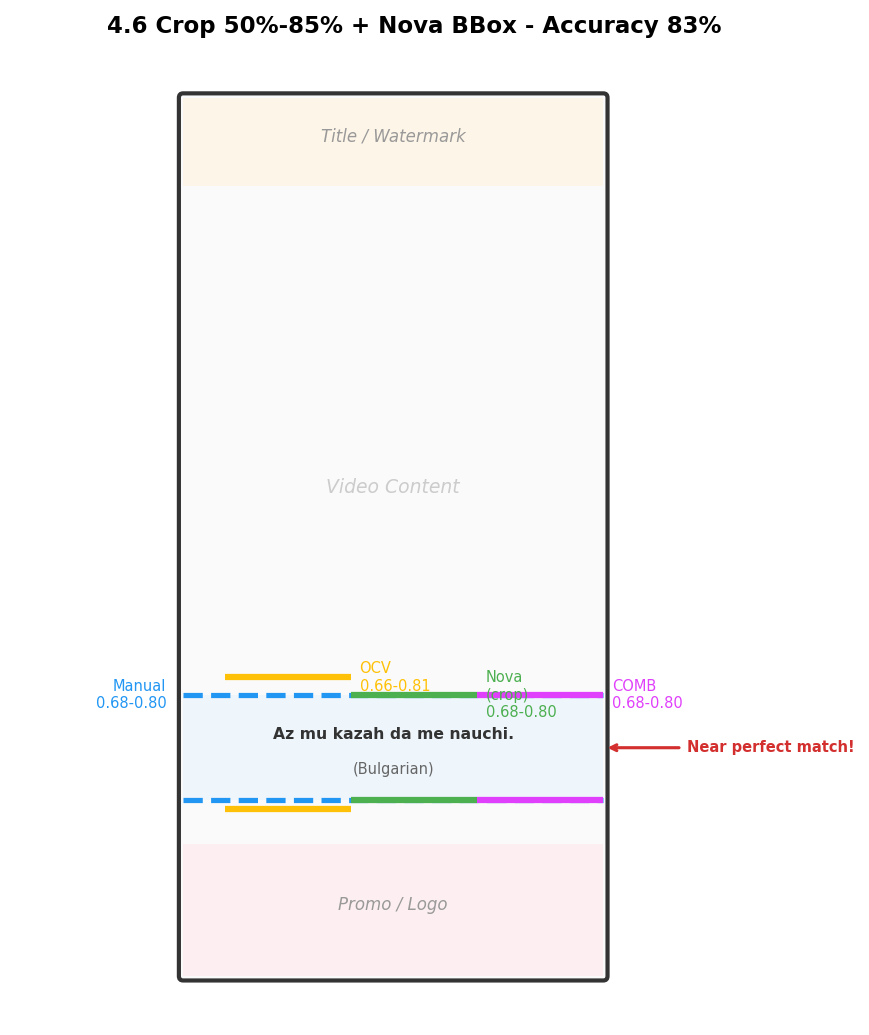
The following example from a Bulgarian video shows the final pipeline’s detection (magenta COMB lines) closely matching the manual ground truth (blue lines):
Final Architecture
Logical Architecture
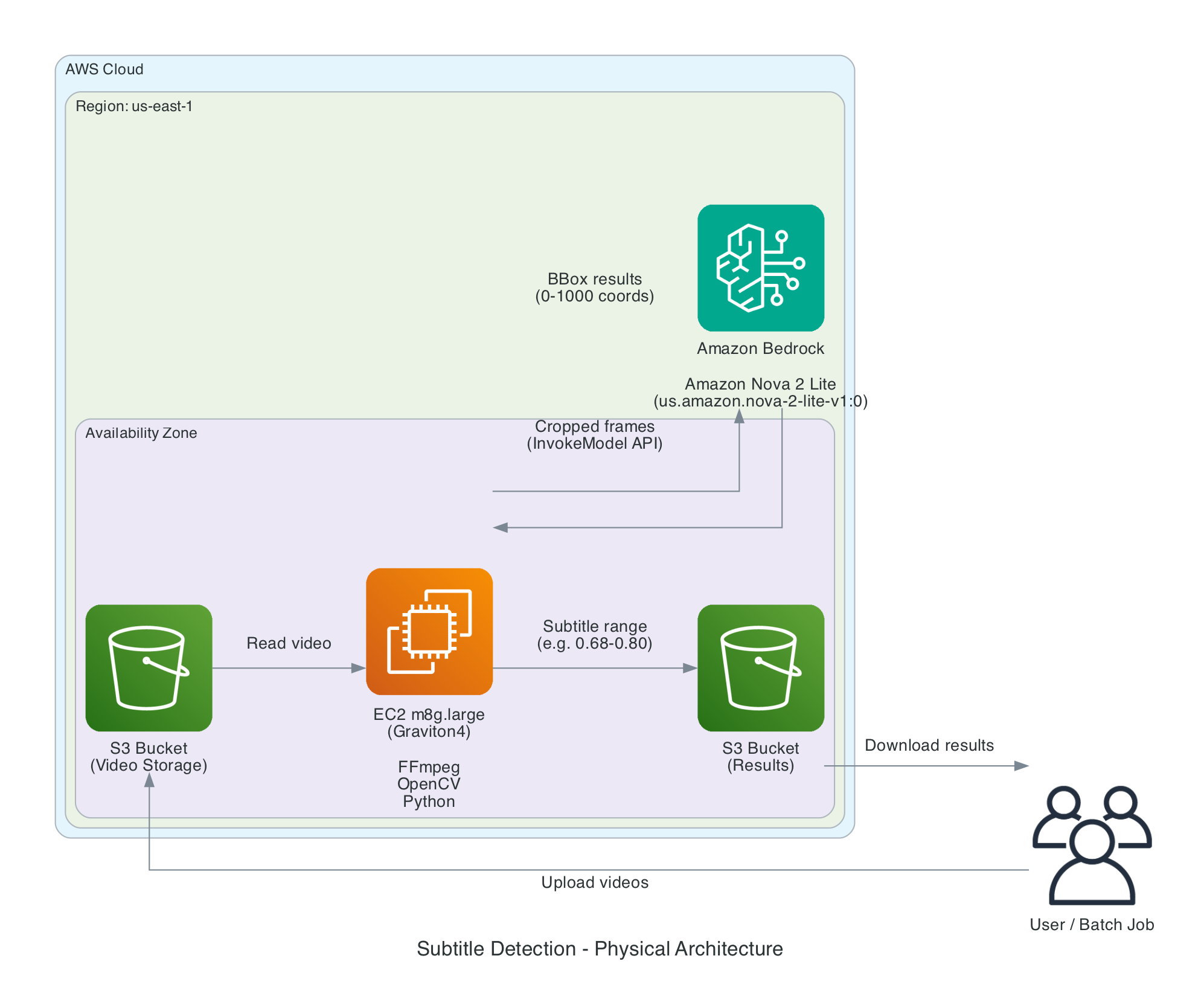
The video file goes through smart frame extraction, then each frame is processed in parallel by both OpenCV and Nova 2 Lite. Results are intersected and aggregated across frames to produce the final subtitle position range.
Annotated Frame Guide
During testing, we generated annotated frames for visual comparison, stored in the frame_3way_annotated/ directory.
Each frame has four sets of color-coded detection lines:
| Annotation | Color | Position | Description |
|---|---|---|---|
| MANUAL | Blue | Full width | Manual ground truth |
| OCV | Yellow | Left 1/3 | OpenCV detection result |
| NOVA | Green | Middle 1/3 | Nova 2 Lite detection result |
| COMB | Magenta | Right 1/3 | Combined final result |
Each method draws two same-colored horizontal lines representing the upper and lower boundaries of the subtitle region. The blue baseline spans the full width for easy visual comparison.
Detailed Test Data
6.1 Test Set
30 videos covering 15 languages, 2 videos per language. Manual annotations serve as ground truth.
Values represent the vertical position range in the frame (0 = top, 1 = bottom). For example, 0.68–0.78 means the subtitle occupies the region from 68% to 78% of the frame height:
| Language | Episode | Subtitle Position (top–bottom) |
|---|---|---|
| Thai | 10, 03 | 0.68–0.78, 0.78–0.78 |
| Portuguese | 09, 10 | 0.62–0.74, 0.68–0.83 |
| Romanian | 10, 09 | 0.69–0.84, 0.66–0.80 |
| Turkish | 09, 03 | 0.62–0.74, 0.63–0.79 |
| German | 08, 07 | 0.68–0.79, 0.62–0.74 |
| Indonesian | 09, 03 | 0.58–0.73, 0.68–0.79 |
| English | 09, 02 | 0.60–0.75, 0.67–0.82 |
| Bulgarian | 09, 10 | 0.68–0.83, 0.66–0.81 |
| Spanish | 09, 10 | 0.63–0.78, 0.68–0.79 |
| French | 08, 10 | 0.68–0.82, 0.68–0.79 |
| Japanese | 08, 09 | 0.68–0.83, 0.61–0.74 |
| Italian | 03, 09 | 0.65–0.79, 0.69–0.82 |
| Vietnamese | 08, 09 | 0.68–0.79, 0.62–0.74 |
| Russian | 06, 07 | 0.61–0.73, 0.68–0.80 |
| Korean | 09, 10 | 0.62–0.74, 0.68–0.79 |
6.2 Accuracy Comparison Across Iterations
| Version | OpenCV | Nova Full-Frame | Nova Cropped | Claude Sonnet 4.6 | OCV + Nova Full | OCV + Nova Cropped |
|---|---|---|---|---|---|---|
| V1 Fixed 5 frames | 30% | 30% | — | — | 53% | — |
| V2 Smart extraction | 40% | 63% | 80% | 30% | 80% | 83% |
6.3 Claude Sonnet 4.6 Comparison
We additionally tested Claude Sonnet 4.6 as a comparison, using a percentage-format prompt to have Claude directly return subtitle top/bottom positions.
Result: 9/30 (30%) — the worst among all methods.
Failure analysis:
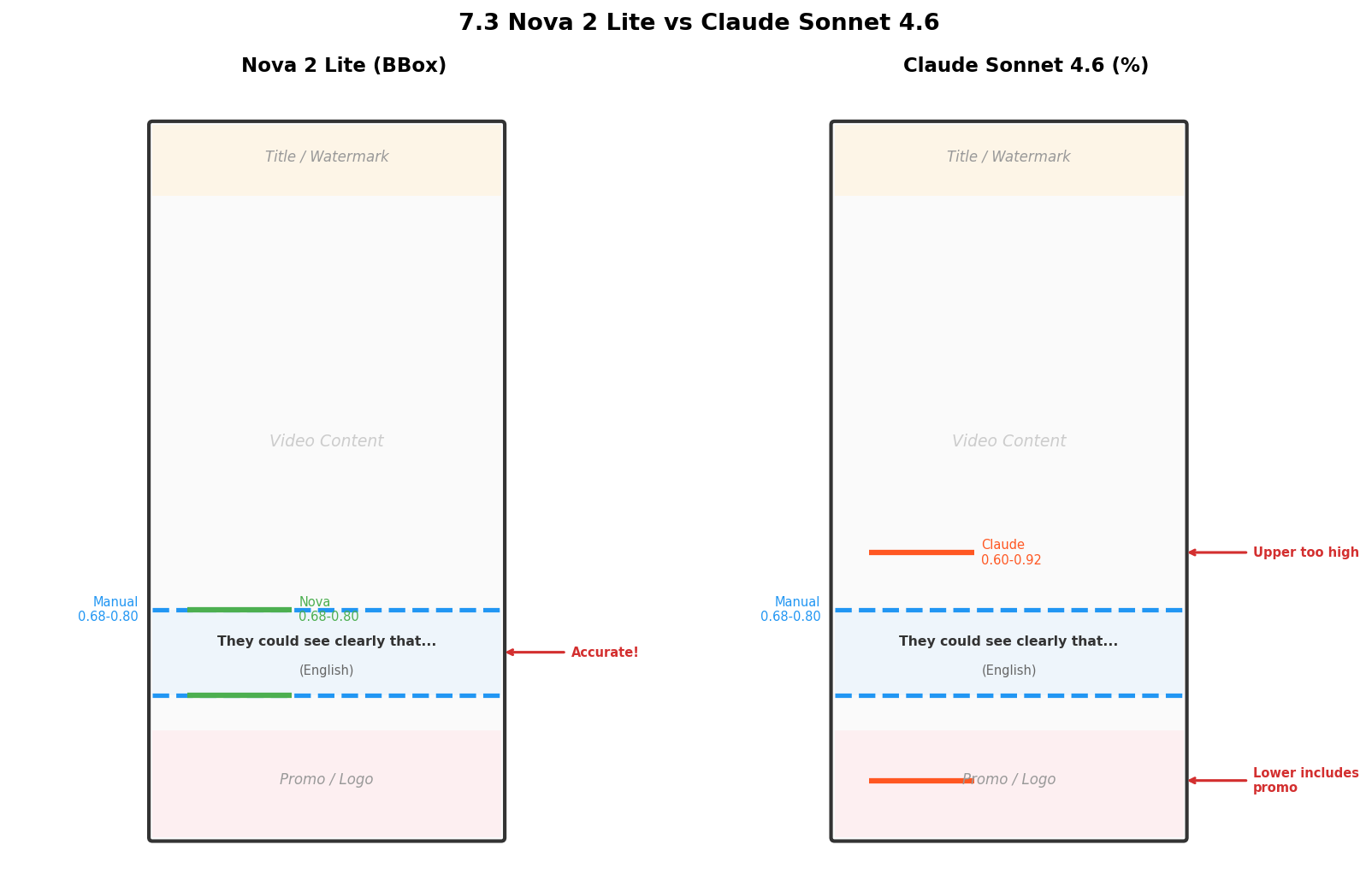
- Lower boundary consistently too large: Claude’s lower boundary almost always exceeded 85%, indicating it could not distinguish dialogue subtitles from bottom promotional banners
- Upper boundary also imprecise: Frequently off by 5–10%, showing weak pixel-level position awareness
- Does not support bbox format: When using Nova’s bbox prompt (0–1000 coordinates) with Claude, results were even worse — coordinates were completely inaccurate
Conclusion: Nova 2 Lite is specifically trained for object detection and bbox coordinate output, making it significantly better than Claude at precise localization tasks. Claude excels at semantic understanding and content analysis, but is weak at pixel-level position perception. For subtitle position detection and similar precision localization tasks, Nova 2 Lite should be the first choice over general-purpose large models.
The following comparison shows the same frame detected by both models. Nova 2 Lite’s boundaries (green) closely match the manual ground truth (blue), while Claude’s lower boundary typically extends past 85%, including the promotional banner:
6.4 Final Per-Video Results
25 out of 30 videos were accurate (deviation ≤ 5%), with 5 having larger deviations (see Section 7). Notably, 10 videos were perfectly accurate (zero deviation), including German/07, Turkish/09, English/09, and Portuguese/09.
Failure Case Analysis
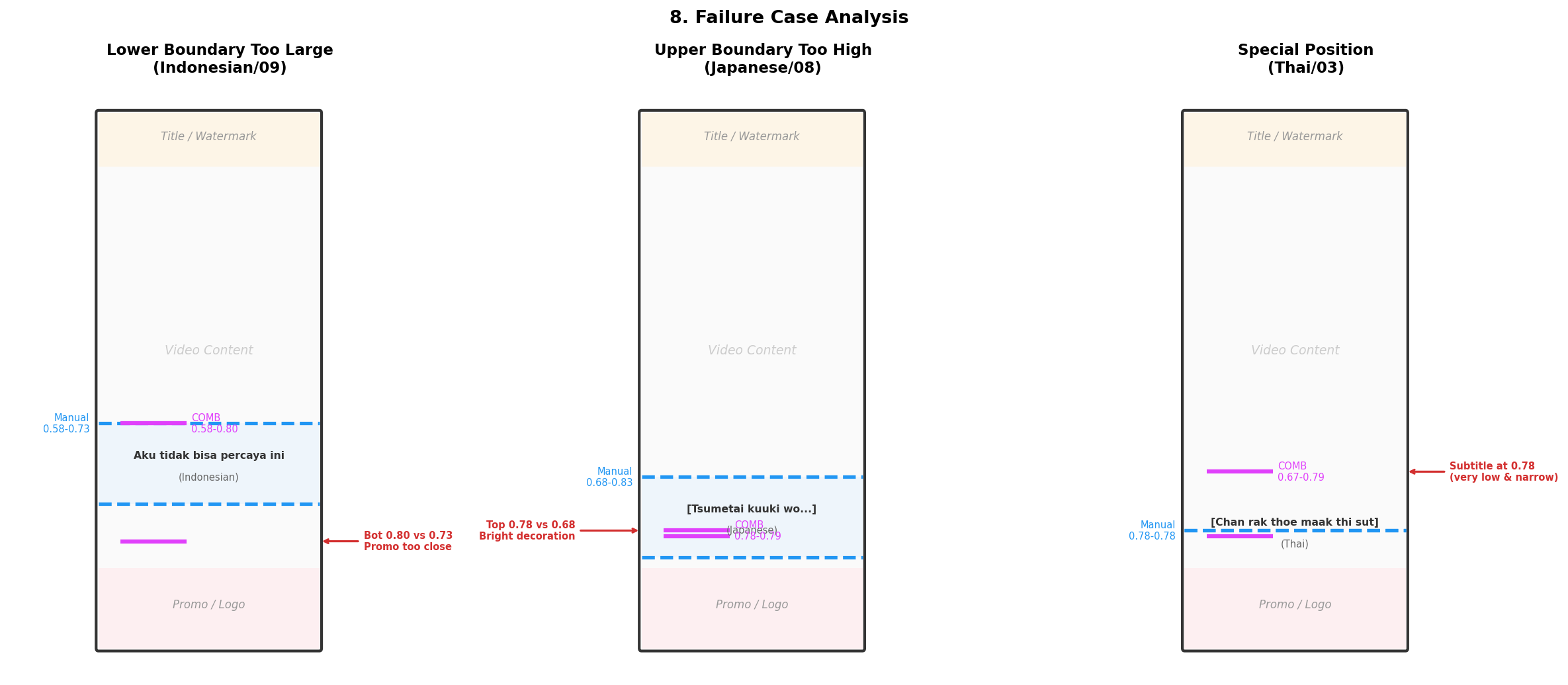
5 out of 30 videos had deviations > 5%, falling into three categories:
Lower Boundary Too Large (2 Videos)
Indonesian/09, Spanish/09: The promotional banner was too close to the subtitle region (gap < 6%). Even after cropping, some promotional text remained within the crop area.
Impact: The lower boundary was ~7% too large. In practice, this means the subtitle eraser removes slightly more area than necessary — but no subtitles are missed.
Upper Boundary Too Large (2 Videos)
- Japanese/08: Upper boundary 0.78 vs. actual 0.68. OpenCV detected white lace decorations in the scene, pulling the upper boundary down.
- French/10: Upper boundary 0.51 vs. actual 0.68. A bright region in one frame triggered a false positive.
Unusual Subtitle Position (1 Video)
- Thai/03: Subtitles were at 0.78 (very low and narrow range), but other frames detected at ~0.67, pulling the upper boundary too low.
The following diagram illustrates the detection deviations for all three failure categories:
Cost Analysis
| Item | Cost |
|---|---|
| EC2 instance (OpenCV + FFmpeg) | Per instance type, e.g., m8g.large (2vCPU/8GB Graviton4, ~$0.077/hr); ~10s per video |
| Amazon Nova 2 Lite invocation | ~$0.0003/frame (input image ~1000 tokens) |
| Per video (5 frames) | EC2 ~$0.0002 + Nova ~$0.0015 ≈ $0.002 |
| 100 videos | ~$0.20 |
The overall cost is extremely low, making this suitable for large-scale batch processing.
Key Code
The following are core logic snippets. For the complete runnable code, see the open-source repository.
9.1 Smart Frame Extraction
Starting at 5%, sample a frame every 5%. Use OpenCV to quickly check for subtitles, skip subtitle-free frames, and collect 5 valid frames:
for pct in range(5, 96, 5):
    if len(good_frames) >= 5:
        break
    # ffmpeg extract frame → OpenCV detect → keep if subtitle found
    img = cv2.imread(str(frame_path))
    if img is not None and ocv_detect(img):
        good_frames.append(frame_path)
9.2 OpenCV Subtitle Detection
Within the 50%–88% ROI, detect subtitle lines using white/yellow thresholding + morphological dilation + contour filtering:
roi = img[int(h * 0.50):int(h * 0.88), :]
# White text: grayscale binarization
_, bright = cv2.threshold(gray, 200, 255, cv2.THRESH_BINARY)
# Yellow text: HSV space filtering
yellow = cv2.inRange(hsv, (10, 80, 180), (45, 255, 255))
# Morphological dilation to connect characters → contour filtering (width > 25%, centered)
9.3 Nova 2 Lite Cropped Bbox Detection
Crop the frame to 50%–85%, send to Nova 2 Lite using the bbox format (0–1000 coordinate space), then map coordinates back to the full frame:
CROP_TOP, CROP_BOT = 0.50, 0.85
crop = img[int(h * CROP_TOP):int(h * CROP_BOT), :]

# Nova bbox prompt (0-1000 coordinate space)
prompt = 'Detect all [dialogue subtitle ...] in this image. '\
         'Output bounding box [x1, y1, x2, y2] scaled between 0 and 1000.'

# Call Amazon Bedrock
bedrock = boto3.client("bedrock-runtime", region_name="us-east-1")
resp = bedrock.invoke_model(modelId="us.amazon.nova-2-lite-v1:0", ...)

# Map coordinates back to full frame
span = CROP_BOT - CROP_TOP  # 0.35
full_top = CROP_TOP + (crop_y1 / 1000) * span
full_bot = CROP_TOP + (crop_y2 / 1000) * span
Why crop? When given full frames, Nova frequently included the bottom promotional banner in its bounding box, pushing the lower boundary to 0.90+. After cropping to 50%–85%, the banner is simply not in the image. Lower-boundary accuracy jumped from 63% to 80%.
9.4 Intersection + Aggregation
# Intersection: Nova's cropped upper boundary is more accurate,
# OpenCV's lower boundary is tighter
top = max(ocv_top, crop_nova_top)
bot = min(ocv_bot, crop_nova_bot)

# Multi-frame aggregation: upper = min - 2%, lower = max + 2%, capped at 0.85
final_top = min(all_tops) - 0.02
final_bot = min(max(all_bots) + 0.02, 0.85)
Summary and Future Work
What Worked
- 83% accuracy — most videos can be auto-detected, significantly reducing manual annotation workload
- Zero misses — smart frame extraction ensures every video gets detected
- Low cost — OpenCV is free + Nova 2 Lite costs ~$0.002 per video
- Tolerable failures — even when deviation > 5%, it is usually the lower boundary being too large (erases a bit extra) rather than too small (misses subtitles)
Core Lessons
- No single method is sufficient. OpenCV excels at precise localization but is prone to false positives. Nova excels at semantic understanding but lacks positional precision. The combination is greater than the sum.
- Prompt format matters. Nova 2 Lite’s bounding box detection format (0–1000 coordinate space) is far more accurate than asking for percentages directly.
- Cropping is the key optimization. Cropping the frame to the subtitle region (50%–85%) before sending to Nova eliminated promotional banner and title interference. Nova’s standalone accuracy jumped from 63% to 80%.
- Smart frame extraction is essential. Skipping subtitle-free frames ensures every video has valid detection frames.
- Simple rules are powerful. A single rule — capping the lower boundary at 0.85 — eliminated the vast majority of promotional banner false positives.
Future Directions
- Smarter banner filtering: Detect brand logo positions and auto-exclude nearby text regions
- Multi-model voting: Use multiple vision models (e.g., different Nova versions) and take the majority consensus
- Video-level features: Analyze subtitle position consistency across frames to reject outlier detections
- Fine-tuned models: Collect more short-drama subtitle samples and train a specialized detection model
If you are interested in this approach, visit the open-source repository aws-samples/sample-for-video-subtitle-detection-via-nova-2-lite for the complete code. Issues and suggestions are welcome on GitHub.
References
References
- OpenCV documentation — OpenCV
- Amazon Nova User Guide — AWS Documentation