Big Data on AWS Deep Dive (Part 3): Data Ingestion — DMS, Zero-ETL, Firehose, and MSK
Four data sources, four ingestion pipelines — learn CDC with DMS, Aurora Zero-ETL, Kafka on MSK, and Firehose micro-batching to land data into your S3 data lake.
The core question in our customer scenario: MySQL, DocumentDB, Elasticsearch, and client-side event tracking — how does each data source land in S3?
This chapter covers four ingestion pipelines and the 7 AWS services involved (DMS, Zero-ETL, OpenSearch Ingestion, Firehose, MSK, KDS, and Lambda).
The Big Picture
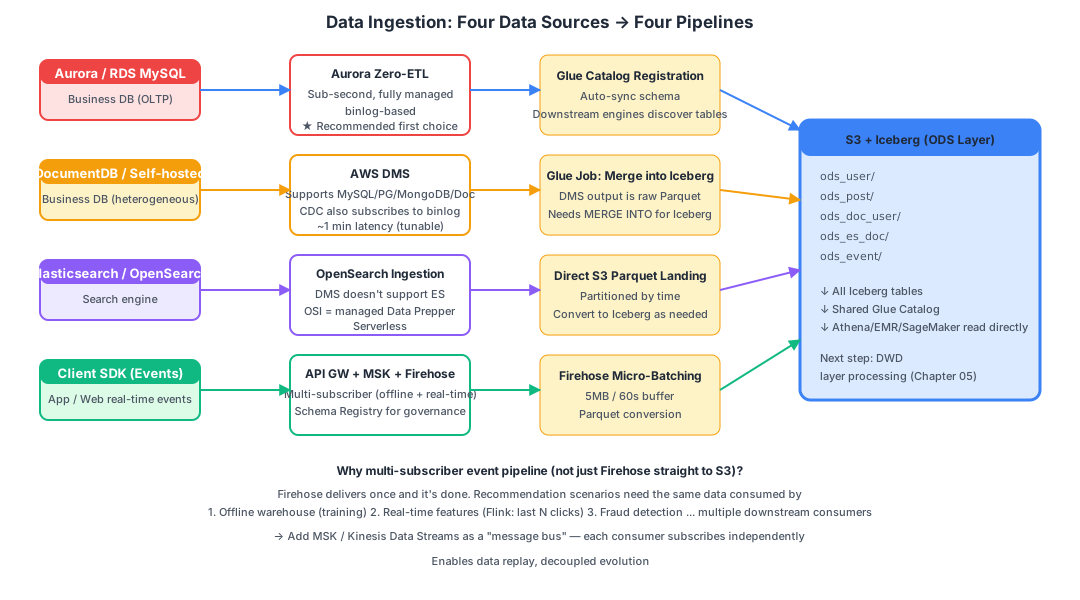
Four data sources map to four ingestion pipelines:
| # | Data Source | Recommended Pipeline | Why |
|---|---|---|---|
| 1 | Aurora / RDS MySQL | Zero-ETL to SageMaker Lakehouse | Sub-second latency, fully managed, AWS-recommended |
| 2 | Self-hosted MySQL / DocumentDB | DMS to S3, then Glue merges into Iceberg | DMS supports 60+ heterogeneous sources |
| 3 | Elasticsearch / OpenSearch | OpenSearch Ingestion to S3 | DMS does not support ES as a source |
| 4 | Client-side event tracking | API Gateway to MSK to Firehose to S3 | Multi-subscriber fan-out, real-time feature pipeline ready |
Let’s dive into each one.
Pipeline 1: Business Database CDC with DMS
What Is DMS?
AWS Database Migration Service is AWS’s managed database migration and synchronization service.
Originally designed for “migrating on-premises Oracle to AWS RDS,” it has evolved into a general-purpose heterogeneous database sync pipeline.
It supports:
- 60+ databases as sources (MySQL, PostgreSQL, Oracle, SQL Server, MongoDB, DocumentDB, Redis, DynamoDB, Kafka, S3, etc.)
- 30+ endpoints as targets (including S3, Kinesis, and OpenSearch)
Two Operating Modes
Full Load (initial bulk load):
- Reads the entire table via
SELECT * FROM tableand writes it to the target - Large tables cause hours of high load on the source database (this is the only phase where DMS creates significant source pressure)
CDC (incremental sync):
- Disguises itself as a MySQL replica, subscribing to the binlog
- Converts each binlog event and forwards it to the target
- Minimal source database pressure (comparable to a real replica)
- Latency of approximately 1 minute (tunable to seconds)
In practice, deployments typically combine both phases: “Full Load + CDC” — run the initial bulk load first, then switch to CDC for continuous synchronization.
The DMS “Three-Piece Set”
Configuring DMS requires creating three objects:
| Concept | Purpose |
|---|---|
| Replication Instance | The “worker” performing synchronization. You choose an instance size (starting at dms.t3.medium), running 24/7 at roughly $50/month |
| Endpoint | Connection details for the source and target (host, credentials, table selection rules) |
| Replication Task | Bundles “which source endpoint to which target endpoint, which tables, which mode (Full Load / CDC / Full + CDC)“ |
DMS Output to S3
When writing to S3, DMS outputs Parquet files (CSV is also supported but not recommended). The directory structure looks like:
s3://my-bucket/dms-raw/
└── poc-mysql-source/
    └── orders/
        ├── LOAD00000001.parquet     ← Full Load initialization files
        ├── LOAD00000002.parquet
└── 20260510-100001234.parquet ← CDC incremental files (includes Op column: I/U/D)Important: DMS output is raw Parquet, not an Iceberg table —
- Duplicate rows: multiple updates to the same row produce multiple records
- No ACID guarantees
- Downstream analytics would get messy results reading this directly
Therefore, after DMS output, you need a Glue Job to periodically MERGE into a proper Iceberg ODS table:
-- Run inside a Glue Spark Job
MERGE INTO ods_user t
USING (
  SELECT * FROM dms_raw_user
  WHERE dt = '2026-05-10'
  -- For rows with multiple changes, keep only the latest
  QUALIFY ROW_NUMBER() OVER (PARTITION BY user_id ORDER BY commit_ts DESC) = 1
) s
ON t.user_id = s.user_id
WHEN MATCHED AND s.Op = 'D' THEN DELETE
WHEN MATCHED AND s.Op IN ('U', 'I') THEN UPDATE SET *
WHEN NOT MATCHED AND s.Op IN ('U', 'I') THEN INSERT *;
DMS Limitations
- You must manage the replication instance yourself (CPU/memory monitoring, scaling)
- Schema changes require manual reconfiguration
- Large transactions (million-row UPDATEs) can cause latency spikes
These pain points gave rise to the next solution: Zero-ETL.
Pipeline 1 Upgraded: Aurora / RDS Zero-ETL
What Is Zero-ETL?
“Zero-ETL” is a product vision AWS introduced at re:Invent 2022 — making the “E (Extract)” and “L (Load)” of ETL require no user code or cluster management.
It’s not that there’s literally no ETL — rather, AWS fully manages the ETL for you.
The Zero-ETL Family (as of May 2026)
| Source | Target | GA Status | Use Case |
|---|---|---|---|
| Aurora MySQL / PostgreSQL | Redshift | 2023-06 GA | BI analytics |
| Aurora MySQL | SageMaker Lakehouse (S3 Tables) | 2025-06 GA | Data lake scenarios — our recommended choice |
| RDS MySQL | Redshift / Lakehouse | Rolling GA from 2025 (available in major commercial regions; GovCloud/China/some newer regions still preview or unsupported — confirm target region before signing contracts) | Same as above |
| DynamoDB | Redshift / OpenSearch | 2023+ GA | Full-text search |
| DynamoDB to SageMaker Lakehouse | Lakehouse | 2025 GA (new) | KV data into the lake |
| SaaS (Salesforce/SAP/ServiceNow/Zendesk) to Lakehouse | Lakehouse | 2024-2025 GA | Cross-system data integration |
| Self-managed MySQL | S3 / S3 Tables (DMS-based) | 2025+ GA | Self-hosted MySQL |
This document defaults to Aurora MySQL to SageMaker Lakehouse. If the customer uses RDS for MySQL, check the table above for target region GA status; otherwise fall back to “DMS-based Zero-ETL” or traditional DMS.
How Zero-ETL to SageMaker Lakehouse Works
Aurora Primary
    │ binlog (still binlog — no black magic)
    ▼
AWS Internal Managed Zero-ETL Service (serverless)
    │
    ▼
S3 Tables (auto-creates Iceberg tables) + auto-registered in Glue Catalog
Key differences:
| DMS (including DMS-based Zero-ETL) | Zero-ETL to Lakehouse | |
|---|---|---|
| Initialization | SELECT * full table read — heavy pressure on large tables | Uses RDS snapshot — never touches the source query engine |
| CDC | Subscribes to binlog | Subscribes to binlog |
| Latency | ~1 minute | Sub-second |
| Output | Raw Parquet (requires further processing into Iceberg) | Iceberg tables directly |
| Metadata | Manual Glue Crawler | Auto-registered in Glue Catalog |
| Operations | Manage replication instance | Fully serverless |
| Pricing | Replication instance + data volume | Change volume + S3 |
Selection Criteria
   Aurora / RDS MySQL          → Zero-ETL to SageMaker Lakehouse (recommended)
   Self-hosted MySQL (EC2/IDC) → DMS-based Zero-ETL to S3 Tables
   DocumentDB / other sources  → Traditional DMS → S3 → Glue merge into Iceberg
   Complex ETL / custom logic  → Traditional DMS (preserves full control)
A common misconception: Many customers assume “Zero-ETL is 100x better than DMS.” In reality:
- During the CDC phase, both use binlog under the hood — source DB pressure is comparable
- The real differences are in the initialization phase (snapshot vs. full-table SELECT) and the operational model
- When customers ask “Does DMS periodically SELECT?” — no, during the incremental phase DMS reads binlog events
Pipeline 2: DocumentDB to S3
Prerequisite: Enable Change Streams
DocumentDB is AWS’s “MongoDB API-compatible” service (it is not actual MongoDB).
DocumentDB doesn’t produce binlog. Instead, it uses Change Streams — the “operation log subscription API” from the MongoDB protocol.
DMS requires the following to perform DocumentDB CDC:
- DocumentDB version 4.0 or higher
- Cluster parameter group with
change_stream_log_retention_durationenabled - DocumentDB Change Streams will increase source DB I/O and cost (write overhead +10-20%)
The Pipeline
DocumentDB (4.0+, Change Streams ON)
    │
    ▼
DMS Replication Task (source endpoint = DocDB, target = S3)
    │
    ▼
S3: dms-raw/docdb/<collection>/...parquet
    │
    ▼
Glue Job MERGE INTO Iceberg
    │
    ▼
ods_doc_user / ods_doc_post
Key notes:
- DocumentDB is a document database — DMS converts BSON to JSON/nested structures before writing Parquet
- Nested structures can be queried in Athena using
dot notation:SELECT user.profile.age FROM ...
Pipeline 3: Elasticsearch to S3 via OpenSearch Ingestion
Why DMS Can’t Be Used
Critical fact: DMS does not support ES / OpenSearch as a source (it can only be used as a target).
This is a common pitfall in the industry: customers write proposals stating “DMS will sync ES to S3” and only discover it’s impossible during the POC phase.
What Is OpenSearch Ingestion (OSI)?
OSI is an AWS managed data ingestion service launched in 2023. Under the hood, it’s managed Data Prepper (an open-source tool).
Features:
- Serverless (billed per OCU = OpenSearch Compute Unit)
- Built-in OpenSearch / Elasticsearch source (uses scroll API / PIT for continuous reading)
- Multiple built-in sinks: S3, OpenSearch, Lambda, Kafka
OpenSearch Service (managed)
    │ scroll API / Point-in-Time
    ▼
OpenSearch Ingestion Pipeline (YAML configuration)
    │
    ▼
S3 (Parquet / JSON)
What About Self-Hosted ES?
OSI only supports AWS-managed OpenSearch Service as a source.
For EC2 or on-premises self-hosted ES, your options are:
- Logstash + S3 output plugin (most common)
- Custom Lambda / EMR Job using scroll API / PIT to pull data
- For small data volumes, periodic
_searchfull exports
But First, Ask This Question
What data is stored in ES?
Common ES use cases:
- A search replica of business data (the original lives in MySQL, ES is just for search) — ingesting directly from MySQL is better; don’t pull from ES
- Log indices (e.g., ELK stack logs) — may not need to enter the data warehouse; CloudWatch or S3 archival may suffice
- Business data that only exists in ES (rare) — must ingest from ES into the lake
The takeaway: first confirm whether the data in ES duplicates what’s in MySQL before deciding whether to build this pipeline.
Pipeline 4: Client-Side Event Tracking — Four Components Working Together
The Basic Pipeline (Customer’s Original Design)
Client SDK ──▶ API Gateway ──▶ Firehose ──▶ S3 (Parquet)This pipeline is functional, but for recommendation scenarios it’s not sufficient — explained below.
API Gateway
A managed API gateway. Two types:
| Type | Price (per million requests) | Latency | Recommended For |
|---|---|---|---|
| REST API | $3.5 | ~30ms | Complex features (caching, usage plans) |
| HTTP API | $1.0 | ~20ms | Event tracking / simple proxying (recommended) |
For event tracking, REST API is overkill — use HTTP API: 70% cheaper with lower latency.
Lambda (Data Enrichment)
API Gateway can route directly to Firehose, but a Lambda layer in between is strongly recommended:
SDK reports: { user_id, event_type, ts, ... }
   ↓
Lambda enrichment:
  + server_ts (server-side timestamp — prevents client clock tampering)
  + ip + geo (resolve IP to geographic location)
  + app_version (extract from User-Agent)
  + authentication (AppKey + HMAC)
  - filter invalid / replayed events
   ↓
Push to downstream
Why not let the client write directly? Because client timestamps are unreliable, IP addresses aren’t accessible client-side, and authentication must be server-side.
Amazon Data Firehose (formerly Kinesis Data Firehose, renamed Feb 2024)
Firehose is a “managed micro-batch conveyor belt”:
- You PutRecord items one at a time
- It buffers in memory (default: 5 MB or 60 seconds, whichever threshold is reached first)
- Automatically converts to Parquet, compresses, and writes to S3 with time-based partitioning
Features:
- Fully serverless (no brokers, no consumer code)
- Automatic retry, backpressure handling, and scaling
- Each delivery stream can only have one primary destination — this is a critical limitation (although you can enable source backup to S3, that’s a failure/audit copy and cannot serve independent consumers for real-time replay)
Firehose output file naming (dynamic partitioning):
s3://bucket/raw/events/event_type=click/dt=2026-05-10/hr=13/
   firehose-events-1-2026-05-10-13-23-01-xxx.parquet
Why Firehose Alone Isn’t Enough: The Multi-Subscriber Problem
Back to the real requirements of a recommendation scenario:
The same event data needs to be consumed by N downstream systems:
  1. Offline data warehouse (every event lands in S3, T+1 model training)
  2. Real-time features (Flink computes last 5 clicks → DynamoDB, millisecond latency)
  3. Real-time fraud detection (Lambda detects anomalous logins → block)
  4. Real-time dashboard (Flink computes GMV → push to frontend)
Firehose’s design is fundamentally producer to single sink — each stream can only have one primary destination. To serve 4 independent consumers, you’d either create 4 Firehose streams (4x the data, 4x the cost) or read back from S3 (killing real-time latency). This is why you need a Kafka/KDS layer in front for “fan-out.”
The Improved Architecture: Adding MSK/KDS in Front
The correct architecture:
Client SDK
   ↓
API Gateway (HTTP API)
   ↓
Lambda (auth / enrichment)
   ↓
Amazon MSK (Kafka)            ← Multi-subscriber message bus
   ├──▶ Consumer Group 1: Firehose → S3 Iceberg (offline)
   ├──▶ Consumer Group 2: Managed Flink → DynamoDB (real-time features)
   ├──▶ Consumer Group 3: Lambda → fraud detection
   └──▶ Consumer Group 4: Flink → real-time dashboard
Amazon MSK vs Kinesis Data Streams
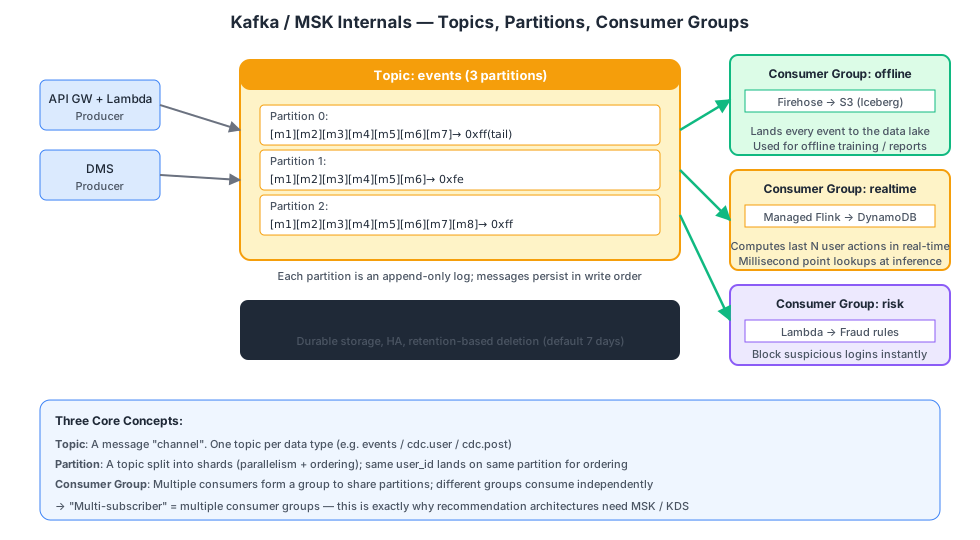
What Is MSK?
Amazon MSK = Managed Streaming for Apache Kafka — an AWS-managed Apache Kafka cluster.
Core model (understand these three concepts and you understand Kafka):
| Concept | Analogy |
|---|---|
| Topic | A channel (one type of data), e.g., events / cdc.user |
| Partition | A topic split into N shards to increase parallelism; messages within the same partition are ordered |
| Consumer Group | A group of consumers that divide partitions among themselves; different groups are completely independent |
The essence of “multi-subscriber”: create multiple consumer groups, and the same data is consumed independently by each group at its own pace.
MSK Deployment Modes
| Mode | Characteristics | Pricing |
|---|---|---|
| MSK Provisioned | You choose broker instance type, AZs, and count; maximum flexibility | Per instance + storage |
| MSK Serverless | Auto-scales; hands-off, but slightly fewer features | Per partition + throughput |
| MSK Connect | Managed Kafka Connect for running various connectors | Per worker instance |
For an event tracking scenario with hundreds of millions of daily events, Provisioned with three m7g.large brokers across 3 AZs costs approximately $400-500/month.
Kinesis Data Streams (KDS)
KDS is AWS’s proprietary “Kafka-like” streaming service (predates MSK).
MSK vs KDS comparison:
| MSK | KDS | |
|---|---|---|
| Protocol | Apache Kafka | AWS proprietary |
| Ecosystem | Full Kafka ecosystem (Flink, Spark, Connect, KSQL) | AWS-native (Lambda, Firehose, Flink) |
| Learning curve | Medium (requires Kafka knowledge) | Low (simple API) |
| Operations | Provisioned requires broker management; Serverless is hands-off | Fully serverless |
| Cost (100M daily events) | Slightly lower | Slightly higher |
| Ordering guarantee | Ordered within same partition | Ordered within same shard |
How to choose:
- Team is familiar with Kafka or uses Flink downstream → MSK
- Fully AWS-native and want serverless → KDS
- When daily volumes are comparable (under a few billion), costs are similar — choose based on team familiarity
Schema Registry (Essential for Event Tracking)
With 50 event types, each with different fields — without schema management, chaos is guaranteed.
AWS Glue Schema Registry:
- Centralized registration of Avro / JSON Schema for each topic
- Producers validate before writing
- Consumers parse on read
- Supports Schema Evolution (compatibility checks)
Complete Improved Architecture
┌─────────────┐
│ Client SDK  │
└──────┬──────┘
       ▼
┌─────────────┐    ┌───────────┐
│ API Gateway │───▶│  Lambda   │ Auth + Enrichment (server_ts, geo, ip)
│ (HTTP API)  │    └─────┬─────┘
└─────────────┘          │
                         ▼
                  ┌─────────────┐
                  │  MSK Topic  │ events (12 partitions, across 3 AZs)
                  │  (events)   │
                  └──┬──┬──┬───┘
       ┌─────────────┘  │  └────────────────┐
       ▼                ▼                   ▼
  ┌─────────┐    ┌────────────┐      ┌──────────────┐
  │Firehose │    │Managed     │      │Lambda (Fraud │
  │  → S3   │    │Flink       │      │ Detection)   │
  │(offline)│    │→ DynamoDB  │      │              │
  └─────────┘    └────────────┘      └──────────────┘
Decision Table: What to Consider for a New Data Source
| Step | Question | Decision |
|---|---|---|
| 1 | Is it Aurora / RDS MySQL? | Yes → Zero-ETL to Lakehouse; No → next step |
| 2 | Is it a DMS-supported source? | Yes → DMS; No → next step |
| 3 | Is it ES / OpenSearch? | Yes → OSI (managed) / Logstash (self-hosted) |
| 4 | Is it streaming events (tracking / logs)? | Yes → API GW + (MSK) + Firehose |
| 5 | None of the above? | Lambda / Glue Job custom ETL |
Chapter Summary
| Pipeline | Key Services | One-Liner |
|---|---|---|
| Aurora MySQL to S3 | Zero-ETL to Lakehouse | Sub-second + serverless + direct Iceberg output |
| Self-hosted MySQL to S3 | DMS-based Zero-ETL | The Zero-ETL path for self-managed databases |
| Heterogeneous sources to S3 | Traditional DMS | Supports 60+ databases; requires managing a replication instance |
| ES to S3 | OpenSearch Ingestion / Logstash | DMS does not support ES as a source |
| Event tracking to S3 + real-time | API GW + MSK + Firehose + Flink | Multi-subscriber fan-out with offline + real-time dual paths |
Next up: once data is in S3, how do you make Athena and Spark recognize it as “tables”?
References
- Apache Kafka documentation — Apache
- Amazon Kinesis Data Streams — AWS Documentation
- Debezium — Debezium